If your agents live only in a screen, you do not really own them
You can use an agent that lives only in an editor. But you do not really own it. For software, ownership means three plain things: you can read it, you can change it with your own tools, and you can take it somewhere else.

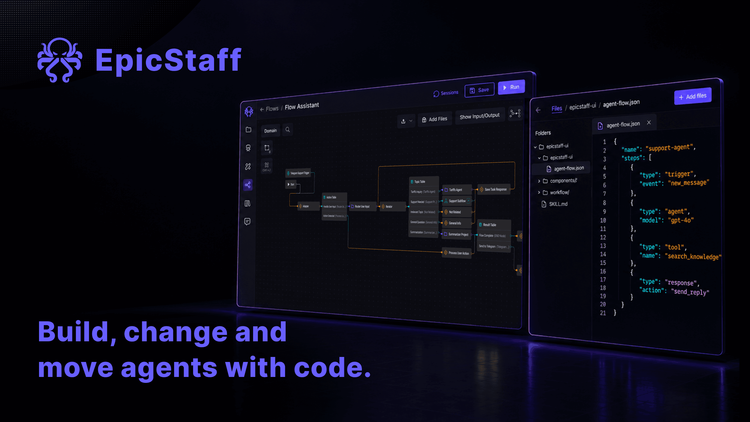
You open the editor. You drag a step onto the canvas, type a prompt, pick a model and press save. The agent works.
Six months later there are twenty agents, four people who change them, a test server and a live server. Every change is now a series of clicks that nobody else saw. Nobody can review it before it goes live. Nobody can repeat it on the second server, except by clicking it all again. And your own AI coding assistant has nothing to read and nothing to write to.
You can use an agent like that. But you do not really own it. For software, ownership means three plain things: you can read it, you can change it with your own tools, and you can take it somewhere else.
What teams report
In forums for automation and agent tools, developers hit the same wall.
One team wanted every saved workflow to go to Git without a manual step. Their plan was to watch the server's log, pull each changed workflow through the API and commit it by hand. They called the plan fragile themselves.
A developer wanted his own AI assistant to build the logic of his agents. The vendor's command-line tool broke. Letting the assistant drive the web screens through a browser failed too.
A self-hosting user changed a workflow from the command line. The tool reported success, and the editor showed the change. But the schedule kept running the old version until a restart. He moved to the REST API.
A small team that builds workflows for clients moved each one from staging to production by hand: export, import, then fix credentials, addresses and environment settings one by one. Source control was in a paid plan they would not buy. A community member offered a workflow that copies workflows through the API, with a map of credential names. He said openly that it gave no branching and no rollback.
And an administrator who runs his platform as code wanted to set a spending limit on each new agent when it is made. The limit existed, but only in an admin screen. No API could set it.
What "agents as code" asks of a tool
"Which version runs live?" is a different question. Here the question is: who, or what, can write an agent?
The teams above did not ask the tool to replace Git, code review or CI. They have those. They asked the tool not to stand in the way. That means four things.
One way in, for people and scripts. If the screen and the API are two different doors, the API door is usually the smaller one, and some settings exist only in the screen. The safest design is one API that the screen itself uses.
A file you can read. An agent exported as a text file can sit next to your code. You can compare two versions and review a change in a pull request.
A move without secrets. The file must not carry passwords or keys. That is right for safety, but on the other installation someone must connect each credential again. A good tool makes that step small and predictable.
A key with known rights. A script acts as somebody. You need to know whose rights it carries.
What EpicStaff gives you to work from code
In EpicStaff, the unit you build, export and move is a flow: its steps and their settings.
The same API the editor uses can create and change flows, their steps and their settings, so a script can build a flow. The API is the one the product itself uses, and an OpenAPI description can be generated from it. Your script, or your AI coding assistant, can work from that description.
A script calls the API with an API key, and the key carries its owner's role rights. A script or CI job can start a flow run through the API with an API key.
A flow can be exported to and imported from a JSON file, without secret values, so you can keep it with your code. Exports never contain keys or passwords; on import, EpicStaff reuses a matching setup already in your organisation, and otherwise creates a new one for you to add the key to. A setup matches only when all exported settings are equal, name included. The exported JSON carries database ids and unsorted keys, so diffs can be noisy. You can save named versions of a flow and restore an earlier one.
EpicStaff has no command-line tool, no built-in Git integration and no built-in step that promotes a flow from test to live.
EpicStaff is source-available under PolyForm Perimeter 1.0.0: read it, run it, modify it for your own use. The main restriction is providing others a product that competes with EpicStaff — free or paid. Inspection is not restricted. Other terms apply, including notice requirements when you pass the software on; see LICENSE.md. So when the API does something you did not expect, you can read the code behind it.
Worked example: one flow, from a script to the live installation
Here is how one flow travels. Each step shows what EpicStaff does, where your own tooling comes in, and the question to ask of any tool, ours included.
- Give the script an identity. EpicStaff: the API key carries its owner's role rights, so pick an owner whose role fits the job. Your part: keep the key in your CI secret store, not in the repository. Ask any tool: whose rights does an automation key carry?
- Build the flow by script. EpicStaff: the editor's own API creates the flow, its steps and their settings. Your part: generate the OpenAPI description and write a small client. Ask any tool: can a script do everything the editor can?
- Try it. EpicStaff: your CI job starts a run through the API. Your part: decide what a good result looks like, and check it. Ask any tool: can CI start a run without a person?
- Export and commit. EpicStaff: the flow goes out as JSON, without secret values. Your part: sort the JSON keys before you commit, so a diff shows real changes; the database ids stay. Then your own Git step: branch, pull request, review. Ask any tool: is the export free of secrets, and readable in a diff?
- Keep a way back. EpicStaff: on the live installation, save a named version of the flow before you change it. Ask any tool: can I return to a known state in one step?
- Import on the live installation. EpicStaff: no keys travel. A setup that matches all exported settings, name included, is reused. Otherwise EpicStaff creates a new one, and someone adds the key once. Your part: give setups the same names and settings on both installations. Ask any tool: can I move an agent to another installation without retyping secrets?
- Decide when it goes live. EpicStaff: no built-in promotion step. Your part: your pipeline is the gate, for example an approved merge to main starts the import. Ask any tool: is there a command-line tool, and is Git built in? For EpicStaff, both answers are no.
So, the core question: can a script build and change an agent, and can you move it without retyping secrets? With EpicStaff, a script builds and changes a flow through the editor's own API. Secrets never travel; on the other installation EpicStaff reuses a matching setup, or you add each key once.
Q&A
How do I manage AI agents as code?
Keep each agent as a text file in Git, change it by script through the tool's API, review changes in a pull request, and move it to the live installation through your own pipeline. First check that the API can do everything the editor can.
Can I build an EpicStaff flow from a script?
Yes. The same API the editor uses can create and change flows, their steps and their settings, so a script can build a flow. The API is the one the product itself uses, and an OpenAPI description can be generated from it. The script's API key carries its owner's role rights.
How do I move a flow to another EpicStaff installation without retyping secrets?
Export it as a JSON file and import it on the other installation. Exports never contain keys or passwords; on import, EpicStaff reuses a matching setup already in your organisation, and otherwise creates a new one for you to add the key to. A setup matches only when all exported settings are equal, name included.
Does EpicStaff have a command-line tool or Git integration?
No. EpicStaff has no command-line tool, no built-in Git integration and no built-in step that promotes a flow from test to live. A flow can be exported to and imported from a JSON file, without secret values, so you can keep it with your code.