Multi-agent systems: when a second agent helps, and what it costs you to run
A multi-agent system splits one job across several AI agents that hand work to each other. The hard part is not the architecture, it is the operations: several agents produce several sets of decisions, and you still owe one account of what happened.

A multi-agent system is a set of AI agents that work on one job and hand work to each other. Each agent has its own instruction, its own tools and its own part of the task, and something above them decides who runs next. That is the whole idea. The hard part is not the architecture, it is the operations: several agents produce several sets of decisions, and you still owe one account of what happened.
Most writing on this topic is aimed at engineers building the pattern. This piece is aimed at the person who has to run it. A worked example from operations, when a second agent earns its place, when it does not, and what to require of the runtime before any of it touches real work.
What a multi-agent system actually is
One agent is a model, a set of tools, and a loop that runs until the job is done or a limit stops it. A multi-agent system is several of those plus one extra decision: who gets the work next. Platforms make that decision in one of three shapes, and it is worth knowing which one you are buying.
- A fixed route. You draw the path once: this agent, then that one, then this. The model still chooses how to do each step, but not who does it.
- A manager agent. One agent reads the job and delegates it to the others. The path is decided while the work runs.
- A hand-off chain. Each agent finishes its part and names the next one. There is no central view; the route emerges.
The three differ in one property: how much of the path is fixed before the run starts. A fixed route is predictable, testable and dull, which are three words for the same good thing. A manager agent copes with the case nobody planned for, and is harder to explain to the person who asks why the job did what it did.
A worked example: invoice exceptions
Take a finance operations team that matches supplier invoices against purchase orders. Most invoices match and are posted without a human. The rest land in an exception queue: a VAT code that does not fit, a delivery split across two notes, a price that moved after the order was raised. A person opens each one, works out which of about a dozen cases it is, and writes to the supplier.
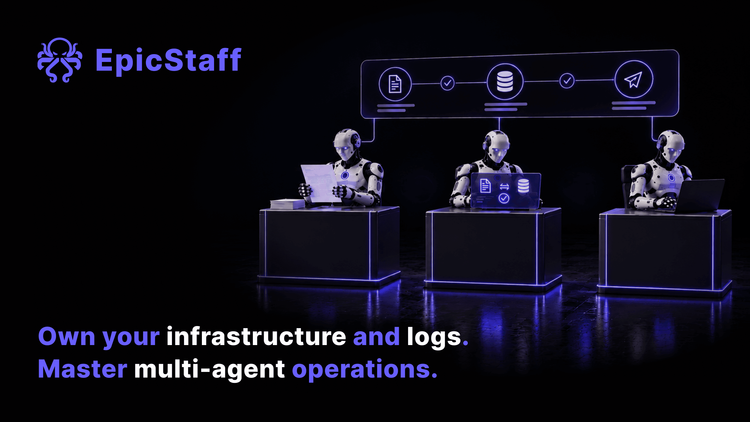
Split across agents, that job looks like this. A reader agent pulls the fields out of the invoice and the delivery note. A checker agent compares them with the purchase order and names the difference. A drafter agent writes the query to the supplier in the right language. The draft lands in the queue the team already works from, and a person sends it.
Three things make the split worth it here. The agents need different tools: the reader needs document handling, the checker needs read access to the order system, the drafter needs neither. They carry different costs when they are wrong: a misread field is caught by the next step, a wrongly worded query goes to a supplier. And they have different owners: the finance lead owns what counts as a mismatch, and nobody else should be editing that instruction.
The split has a price, and you should say it out loud before you commit. Three agents mean three instructions to maintain, three sets of tool permissions to review, and one more place where a job can stop halfway with nobody watching. Multi-agent is an operating cost, not a free upgrade.
When one agent is enough
Use one agent when the steps run in the same order every time and touch the same systems. One agent with four tools is easier to test, cheaper to run and far easier to explain than four agents with one tool each. Split when the parts genuinely differ in tools, in what a mistake costs, or in who owns the instruction.
There is a quick test. Say what each agent would do differently when the input is strange. If you cannot, you have one agent wearing three hats, and the hats are costing you money.
What multi-agent adds to the failure list
Single agents already fail in familiar ways. Adding agents adds three more, and all three are operational rather than clever.
The record breaks at the hand-off. Each agent writes what it did. The question you will be asked is what the job did. If the record cannot be assembled across the agents that worked on one case, you have several partial accounts and no whole one, which is where most of the debugging time goes.
Permissions multiply. One agent with four tools is four decisions. Four agents with four tools each is sixteen, and the sixteenth gets copied from a template at five o'clock. The widest permission in the set is the one that matters, and it is not usually the one anybody reviewed.
Nobody owns the loop. Two agents can pass work back and forth, each waiting for the other to be satisfied. It looks like progress in a dashboard and it spends money at the model provider. Something outside the agents has to hold a limit on steps, time and cost, and stop the run when it is reached.
What to require of the runtime
This is the list to take to any vendor, ours included. Four things.
- One record per run, assembled across agents. Each step, each tool call, each input and result, tied to the run they belong to. Written by the runtime, not narrated by the model, because a model's account of its own work is text and not evidence.
- Tool permissions per agent. The reader agent does not need write access to the order system. Set what each agent may call before it runs, and start from nothing allowed.
- A stop condition that the agents do not control. Limits on steps, time and spend, enforced from outside the loop.
- Definitions you can review in one place. Each agent's instruction, tools and knowledge, readable and versioned, so a change is something a person can see rather than something that happened.
Ask to see all four in the version you would install, not in a demo of the newest branch.
Where you run it, and who keeps the record
A multi-agent system reads your documents, holds your credentials and touches your systems, several times over. So the deployment question rides along with the technology: whose machines it runs on, which model endpoint it calls, and whose database the record is written to. If the record lives in a vendor's system, your account of what happened lasts as long as your contract does.
EpicStaff runs on your infrastructure. It is source-available under PolyForm Perimeter 1.0.0: read it, run it, modify it for your own use. The main restriction is providing others a product that competes with EpicStaff — free or paid. Inspection is not restricted. Other terms apply, including notice requirements when you pass the software on; see LICENSE.md. Agents, tools and graphs are objects you define, so a multi-agent set-up is something a person can read before it runs. The record of prompts, tool calls and model responses is written to your own PostgreSQL database, and you can export it as JSON or CSV. Role-based access control is in the source-available tier, not the paid one. An agent reaches another system only through tools your team attaches to it: Python tools (your own, or ready-made ones EpicStaff ships) or an MCP server (Model Context Protocol) your team connects. EpicStaff connects out only to the providers you configure keys for. Tools do what you tell them: a tool you build or enable that reaches the internet is your choice and your configuration.
Q&A
What is a multi-agent system?
A multi-agent system is several AI agents working on one job, each with its own instruction, tools and part of the task, handing work between them. Something decides who runs next: a fixed route you drew, a manager agent that delegates, or each agent naming its successor. The difference from a single agent is not intelligence, it is that the work and the permissions are split.
When should I use multiple AI agents instead of one?
Split the work when the parts need different tools, carry different costs when they go wrong, or belong to different owners. Keep one agent when the steps run in the same order and touch the same systems, because one agent with several tools is easier to test and cheaper to run. If you cannot say what each agent would do differently on a strange input, you do not need the second one.
What goes wrong with multi-agent systems?
Three things, and none of them is the model. The record of what happened breaks at the hand-off between agents, so nobody can assemble the account of one job. Tool permissions multiply, and the widest one is rarely the reviewed one. And agents can pass work back and forth without finishing, which needs a limit on steps, time and spend held outside the agents themselves.
Can I run a multi-agent system on my own servers?
Yes. Some agent platforms are cloud-only and others are built to be self-hosted. EpicStaff is one of the self-hosted ones: source-available under PolyForm Perimeter 1.0.0, running on your infrastructure, with agents, tools and graphs defined as objects you can review. The record of prompts, tool calls and model responses is written to your own PostgreSQL database and exports as JSON or CSV. EpicStaff connects out only to the providers you configure keys for. Tools do what you tell them: a tool you build or enable that reaches the internet is your choice and your configuration.