Which client is this AI bill for?
One provider bill, many clients and flows. Six checks to split AI cost per client and per flow, and what to set up before the next bill.

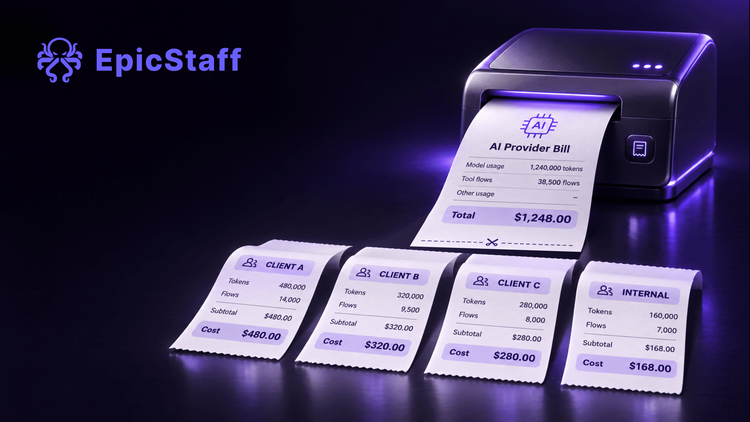
The model provider's bill arrives at the start of the month. It shows one account and one total.
Behind that total sit many flows. Some serve client A, some serve client B, and some serve an internal team. The total does not say which. So you cannot charge each client its share, you cannot set a fair budget for the next project, and you cannot see which flow became expensive last week.
This is a common problem for agencies that run AI workflows for clients, and for internal platform teams that run them for departments on one shared install. Three reports from June to October 2026 show how it looks.
Three reports about one total
An agency that could not split the bill. An agency that builds AI agents for business clients described its lessons on a forum in June 2026, after about a year of client work. The model provider's dashboard showed total spend. It did not show which client was spending, or which session had failed. Splitting cost per client was more work than the team expected. Their advice to anyone with several clients on the same infrastructure: plan the split early, because adding it later is hard. They also found that clients did not want a full dashboard. What clients wanted was short: the sessions, the cost, and whether it worked. The agency now records everything from the first day.
One workflow, three quarters of the bill. A user who runs a workflow tool on their own server reported on a forum in September 2026 that the model provider's bill showed only a total. So the user added up the token use of their own runs, per workflow and per model. One scheduled workflow was three quarters of the bill. It ran far more often than the user thought: a schedule change had been saved but never published, so the old version kept running. After the user published the change, the monthly bill fell to less than a tenth. Two other users in the thread reported the same saved-but-not-published trap. One of them now exports the runs once a month to see which workflows ran more often than expected. For more on the gap between a saved flow and a live one, see What runs live is not what you tested.
Five services, five dashboards. In October 2026, a user asked on the same forum how to see what one run of a workflow costs when it calls several paid services: a search service, a scraper, a data service, a language model and an image model. Each service has its own credential and its own dashboard. The user noted that the model part can be estimated from tokens, but the other services charge per request, per result or per credit, and not all of them return a cost. One idea in the post was a separate credential per workflow, which means many more keys to manage.
A fourth user put the problem in one line in July 2026: the API bill comes as one sum at the end of the month, and when it doubles, the user cannot tell which workflow did it.
The total is not the problem
Each report has the same shape. The provider counts per account. The work happens per flow and per client. Someone has to connect the two, and in these reports that someone was the user, with a script, an export or a spreadsheet. That work is easier when the platform stores the right facts with each run, and hardest when you start after the bill has come.
Six checks for splitting AI cost
These checks apply to any platform that runs AI workflows and agents, ours included. Where EpicStaff answers a check, the answer is under it.
1. Can you read token use and cost for each run?
The split starts with one run. Find out whether the platform stores tokens and a cost for every run, and how it works out the cost. A cost from list prices is an estimate: your contract price, a discount or a self-hosted model can make it differ from what you pay. Compare the estimate with the provider's bill every month. Count paid services outside the model, such as search or data services, on their own.
In EpicStaff: Each run stores its token use and an estimated cost in US dollars, worked out from the price set on the model setting or, if none is set, from the public price list. If neither the model setting nor the public price list has a price for the model (for example a self-hosted model), EpicStaff records its cost as 0.
2. Can you add it up per flow and per date?
A cost per run is the raw material. You need it per flow, and per week or month. Check whether your platform can add up cost per flow, or whether you need a script over its API. If it is a script, write it once, run it every week, and keep the results.
In EpicStaff: Through the API, the detailed session list returns these figures for each run and filters by flow and by date.
3. Can you tell which client a run was for?
A flow often serves more than one client. Find out what a run records about where it came from: the organisation or workspace it ran in, who or what started it, and its input values. Then pick one way to mark the client, and use it everywhere. If each client has its own organisation or workspace, that marks the client. Where one flow serves many clients, pass a client id into every run as an input value.
In EpicStaff: Each run belongs to one organisation and stores who started it (a user or an API key) and the flow's input values, which the API returns.
4. Does the screen show a total, or do you add it up?
Check what the screen shows, and where: tokens per step, a cost per run, a total per flow or per client. Then decide who reads the numbers for each client, and from where. If the screen shows steps and the client wants a monthly sum, the sum comes from your weekly script, not from the screen.
In EpicStaff: On screen, the token count appears for each agent step as the step finishes, and a dollar figure appears on classification decision-table steps.
5. Can each client use its own provider key?
The cleanest split is one the provider makes for you. If each client's runs use a key on that client's own provider account, the provider's bill for that account is that client's bill. Check where the platform takes the key from: per install, per organisation, per agent or per run. Then set it up once per client, and test it with one run before go-live. A separate key per client also limits what one leaked key can reach; see One key, every client: the quiet risk inside your automation server. For what changes when the key is yours and not the tool vendor's, see Whose key is it?
In EpicStaff: Each model call uses the key of its own model configuration. So one organisation per client puts all of that client's usage on its own provider account. If clients share one organisation, give each client its own configurations.
6. Is there a cap per client or per flow, or only per run?
A cap per run stops one runaway run. It does not stop a flow that runs too often, as in the second report. Check which caps exist: per run, per flow, per client, per month. For each one the platform does not give you, set a budget alarm at the provider, on each client's account. For more on spend that nobody saw, see Nobody noticed the agent was spending money. For limits that stop a run while it is still going, see Who stops the loop? Limits that act during the run.
In EpicStaff: The built-in cap is a token budget per run, set per run through the API or as one default for the whole install, and it stops the run after the step that crosses it.
One client, one month, worked through
Take one client and last month. Your script asks the API for every run of that client's flows in that month. It groups the runs by flow, using the organisation or the client id in the input. It adds up the tokens and the estimated cost per flow. Runs on a self-hosted model are counted in tokens, because their price is your own hardware.
Then the script puts that total next to the bill of the provider account that the client's key belongs to. The two will not match to the cent. A small gap is price: a discount, a currency, rounding. A large gap is a question: a flow that runs on another key, a paid service outside the model, or runs you did not expect, like the unpublished schedule in the second report.
The result fits on one screen: the runs, how many of them worked, the tokens, the estimated cost, and each flow's share. That is close to what the agency in the first report found its clients wanted: something short enough to send to their manager.
Q&A
How do I track LLM cost per workflow?
Store the tokens of every model call with the run, and record which workflow the run belongs to. Then add them up per workflow on a schedule, for example every week, with a script or an export. Use the price you actually pay, not only the list price. Check the result against the provider's bill each month; a large gap points to a workflow you did not count.
How do agencies charge AI costs on to their clients?
There are two usual ways. In the first, each client has its own provider account and key and pays the provider directly, and the agency charges for its own work. In the second, the agency pays the provider and passes on a measured share to each client, which needs a reliable split per run. Agree in the contract which way applies, and what happens when a run goes wrong and costs more than planned.
Why does the AI cost in my platform not match the provider's bill?
A cost shown in a platform is often an estimate from list prices. Your bill can differ because of a negotiated price, a currency, rounding, models with no list price, or calls made outside the platform with the same key. A gap that grows from month to month is worth a look: it often means that a key is shared with something you do not count.
Can I see AI cost per client in EpicStaff?
Each run stores its token use and an estimated cost in US dollars, worked out from the price set on the model setting or, if none is set, from the public price list. If neither the model setting nor the public price list has a price for the model (for example a self-hosted model), EpicStaff records its cost as 0. Each run belongs to one organisation and stores who started it (a user or an API key) and the flow's input values, which the API returns. Each model call uses the key of its own model configuration. So one organisation per client puts all of that client's usage on its own provider account. If clients share one organisation, give each client its own configurations. For a total per client, group the runs by organisation or by a client id in the input, and add them up in your own script.